The problem it solves
Most “my sensor does not work” problems are wiring: SDA and SCL swapped, a missing ground, a 5 V module on a 3.3 V pin, an LED on an input-only pin, a strapping pin that stops the board from booting. BoardPilot does not guess: it measures, shows and explains.
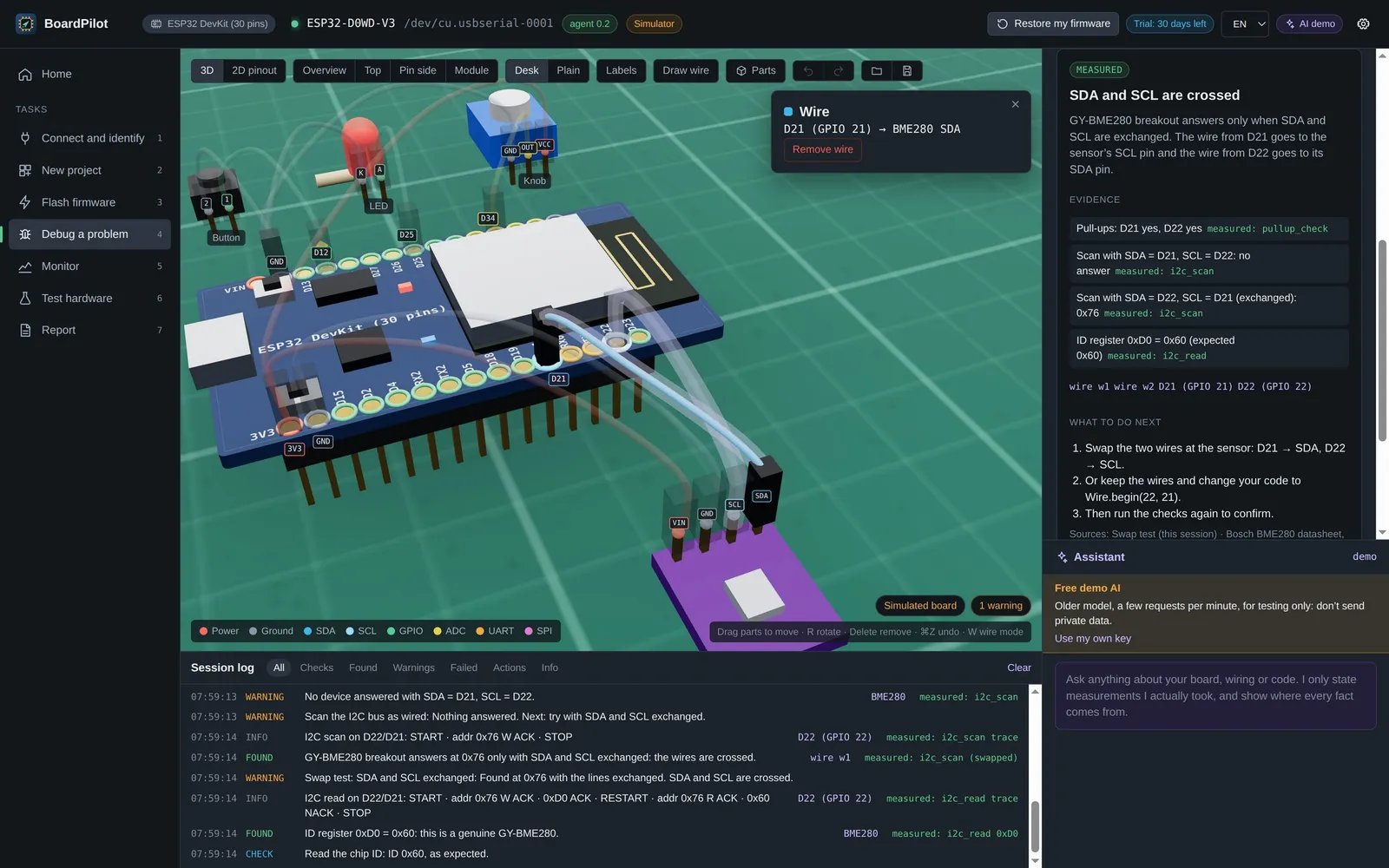
- MeasureA small diagnostic firmware reads the real pins: pull-ups, I2C scan, SDA/SCL swap test, the chip-ID register (it tells a BMP280 from a BME280), brownout and baud-rate detection.
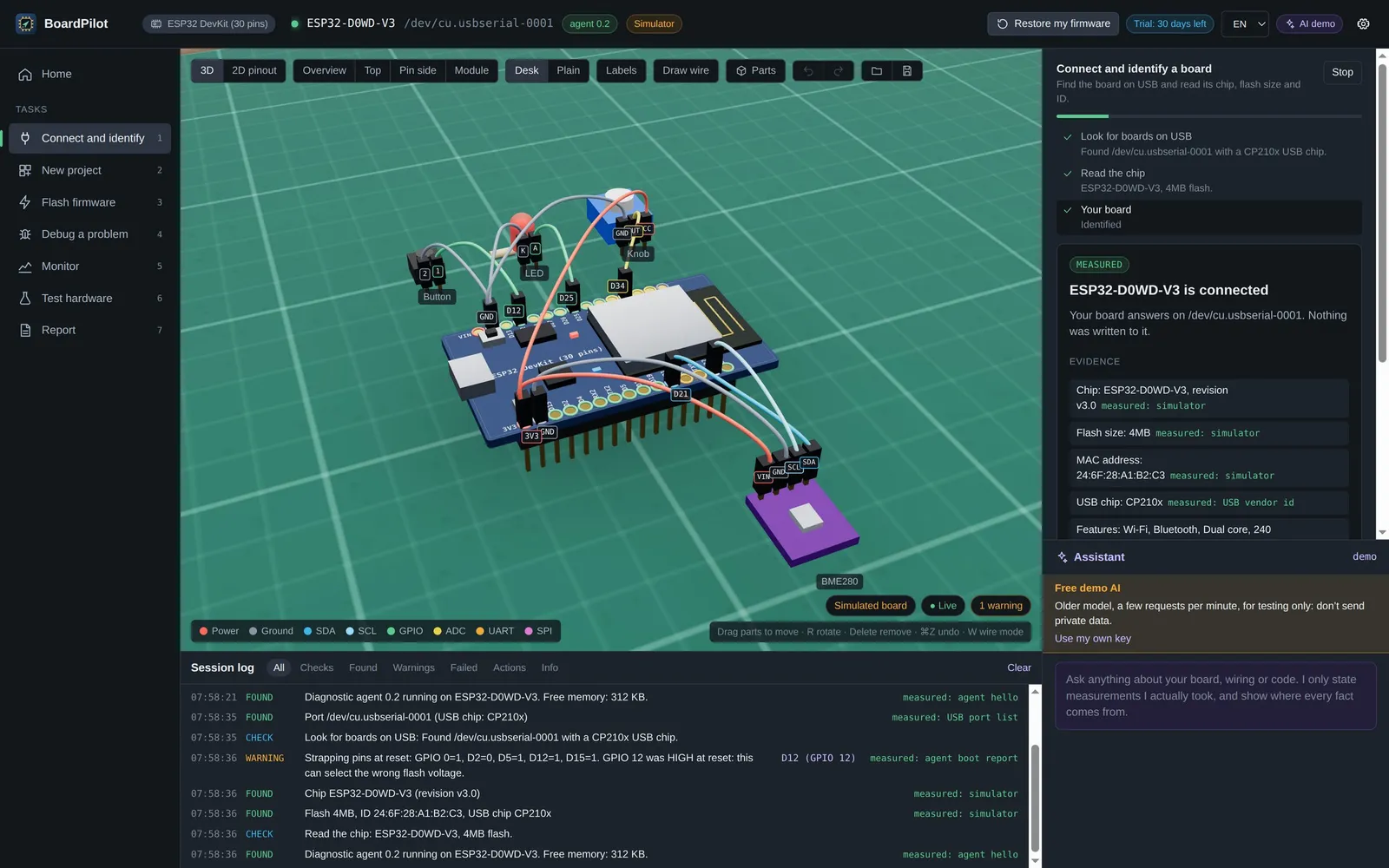
- ShowThe result appears on a 3D model of the board generated from its data: every pin is a clickable object, and every log line moves the camera to the pin or wire it is about.
- ExplainThe cause in plain words, with the measurements and the datasheet section behind every claim, and what to do next.
What it does
- Guided debugging: step-by-step flows for a sensor that does not answer, a board that is not detected, a board that keeps resetting and garbage on serial. It detects the board, chip, flash and USB bridge by itself, and asks only for what it cannot see.
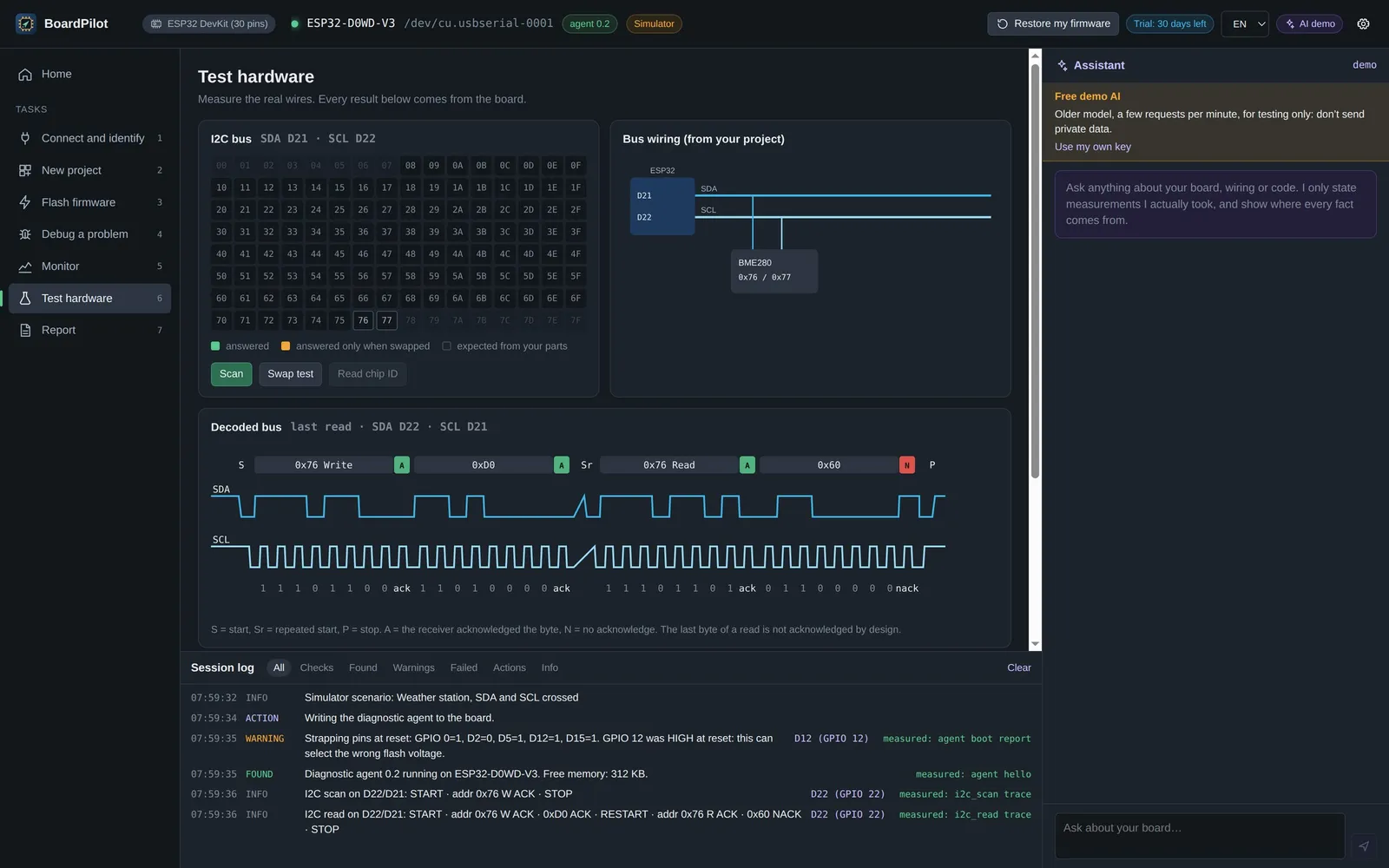
- Test hardware: I2C address grid, bus diagram and bit-level decoded transactions, GPIO and ADC tests.
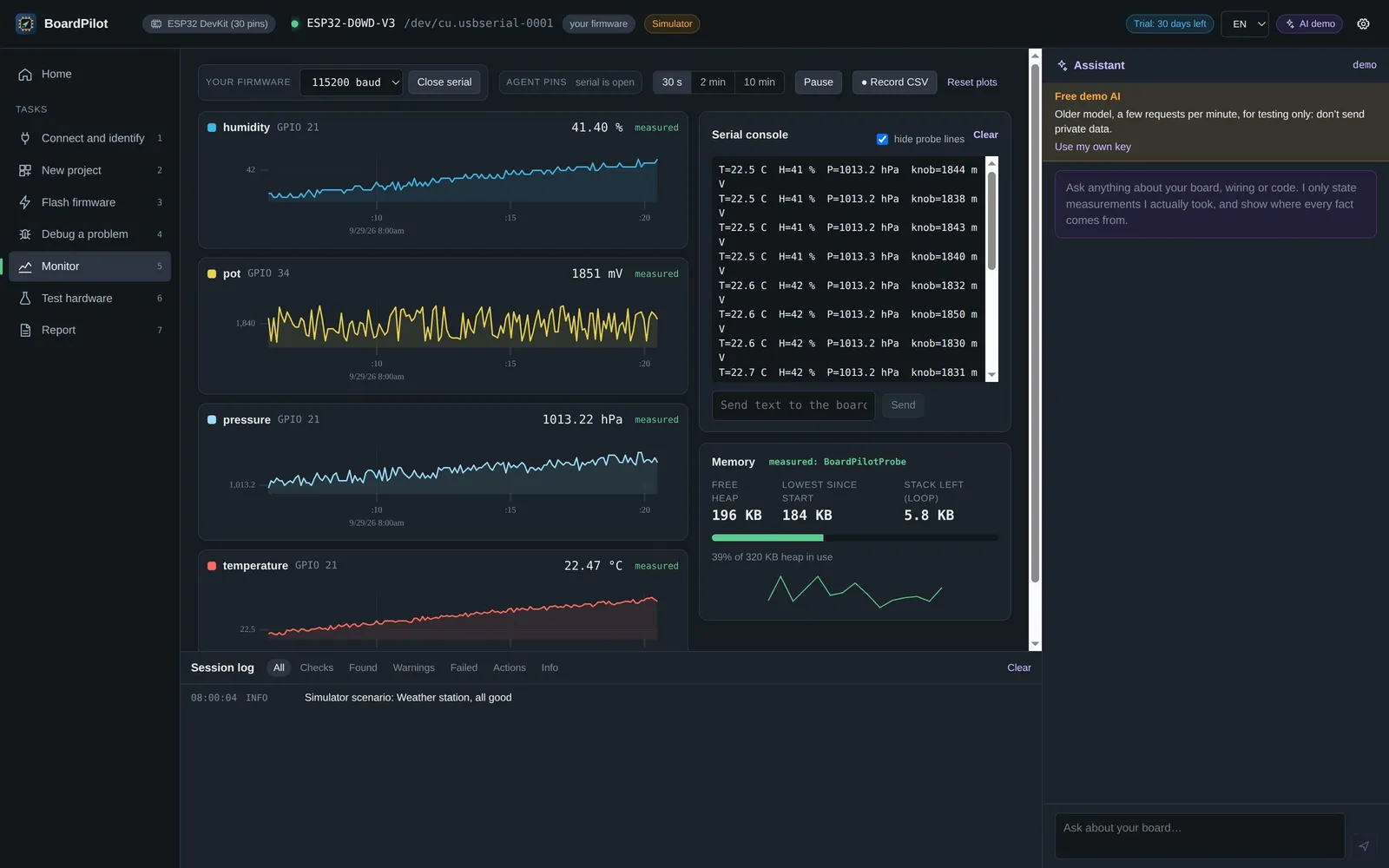
- Monitor: serial console, live plots colored by pin, CSV recording, the firmware’s heap and stack.
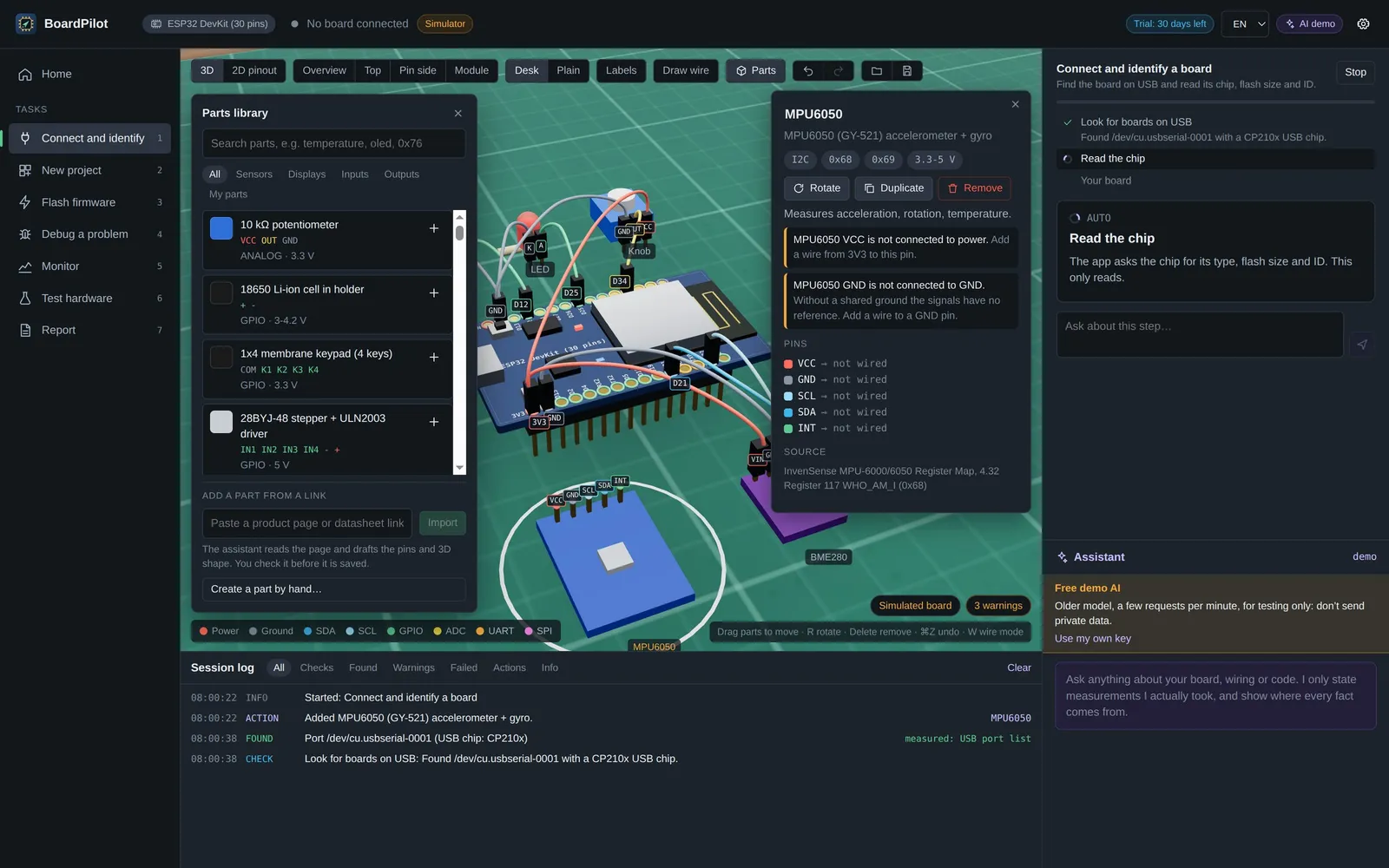
- Projects in 3D: parts from a library of 380+ components, wires, wiring rules that flag mistakes as you build, a pin planner, a shopping list, an SVG wiring diagram and a check of the Arduino code against the drawing.
- Safe flashing: read-only until you confirm; before the first write the firmware is backed up and comes back with one click, and a pre-flight check makes sure the file is made for that board.
- Templates and lessons: five ready-made projects that build themselves on any board, a live run view in the simulator and eleven interactive embedded lessons.
- Reports: the session as Markdown and PDF, with the diagram and a 3D snapshot.
13 supported boards
No board is hard-coded: every board is a data file with pins, functions, rules, toolchain and sources, validated automatically. The 3D model and the rules are built from that file.
- ESP32: ESP32 DevKit (30 pins), ESP32-S3-DevKitC-1, ESP32-C3-DevKitM-1 · esptool
- Raspberry Pi: Pico, Pico W (RP2040), Pico 2 (RP2350) · picotool / UF2
- Arduino (AVR): Uno R3, Nano, Mega 2560 · avrdude
- STM32: NUCLEO-F401RE, Black Pill F411CE · STM32CubeProgrammer, stlink or dfu-util
- Nordic and Teensy: nRF52840 DK · nrfjprog; Teensy 4.1 · Teensy Loader
An open parts library
More than 380 sensors, displays, drivers, radios and modules, each with its pins and roles, supply voltage, I2C addresses, chip-ID register, 3D shape and sources. The data is free to reuse under CC BY 4.0, and the website generates a page for every part, a pinout for every board and part-by-board wiring guides, in English and Italian.
Honest AI, for agents too
- Optional assistant with Claude, GPT or Gemini, with your own key stored encrypted on your computer. It only states what it measured, labels guesses as suggestions and cites its sources.
- MCP server: AI coding agents such as Claude Code, Cursor and Claude Desktop use the real board through BoardPilot. Every result carries its provenance, and nothing is written without the user’s click.
How it is built
- Desktop app: Electron, React and TypeScript in strict mode, state in Zustand; the renderer never touches serial ports, files or API keys.
- 3D: three.js with React Three Fiber; the board is generated from its data file, pin by pin.
- Hardware: serialport plus esptool, avrdude, picotool, STM32CubeProgrammer, nrfjprog and Teensy Loader, behind one interface with timeouts and plain-language errors.
- Firmware: a C++ diagnostic agent built for all 13 boards and the BoardPilotProbe library, both MIT-licensed.
- Simulator: a simulated driver with the same interface as the real one, plus fault scenarios, so the app runs and is tested without hardware.
- Quality: 2,335 automated tests (Vitest) on wiring rules, protocols, flows and board data, CI and macOS and Windows releases with GitHub Actions; English and Italian UI, checked by the tests.
What it shows, for your company
BoardPilot brings together the two halves of my work: firmware and hardware on one side, software and AI on the other. The same skills are what it takes to get reliable data out of your devices and build tools and models on top of it.
Frequently asked questions
Who built BoardPilot?
I designed and built it: Mojtaba Amini, AI Software Engineer in Verona, Italy — product, desktop app, diagnostic firmware, parts library and website.
Do I need a board to try it?
No: simulator mode runs the whole app without hardware. For real boards, just plug them in over USB.
Is it free?
It is free to try for 30 days, then it needs a license key. The source code is public (source-available), the firmware is MIT-licensed and the parts data is CC BY 4.0.
Which systems does it run on?
macOS (Apple Silicon and Intel) and Windows, in English and Italian.